Managing your brand in AI answers has two halves: seeing where you stand across ChatGPT, Gemini, Google AI Overviews, Grok, and Perplexity and acting on it. CrowdReply already did the seeing. MCP now removes the friction from the acting: instead of clicking through the dashboard, you talk to your account.
What is the Model Context Protocol (MCP)?
MCP is an open standard from Anthropic (launched November 2024) that lets AI assistants connect securely to external tools and data. Think of it as a USB C port for AI: one standard connection instead of a custom integration per tool.
In practice, MCP lets an assistant like Claude work inside CrowdReply pulling your live numbers and carrying out tasks, with your approval. No API keys, no code.
What you can do
CrowdReply over MCP does four things: ask questions and get live answers, analyze without exporting, act in bulk with one instruction, and manage content, keywords, and account admin all from chat.
Ask
Live answers, in chat.
“What’s my AI visibility this month?”Analyze
Compare and cross-reference, no export.
“Where are competitors cited but I’m not?”Act in bulk
Dozens of changes, one instruction.
“Pause every zero-visibility prompt.”Manage
Content, keywords, and account admin.
“Add these 30 keywords.” (paste list)How it works
- You ask in plain English, a question or an action.
- The assistant calls CrowdReply securely over MCP.
- Live results appear in the chat.
- You approve any change before it runs.
See it in action
You: Which prompts lost visibility this month, and who took it?
CrowdReply: Four dropped. Three lost ground to the same competitor. Want their cited sources?
You: Yes. And pause anything sitting at zero.
CrowdReply: Ready to pause 6 prompts, approve to run. (Two-step confirmation.)
Connect in one click
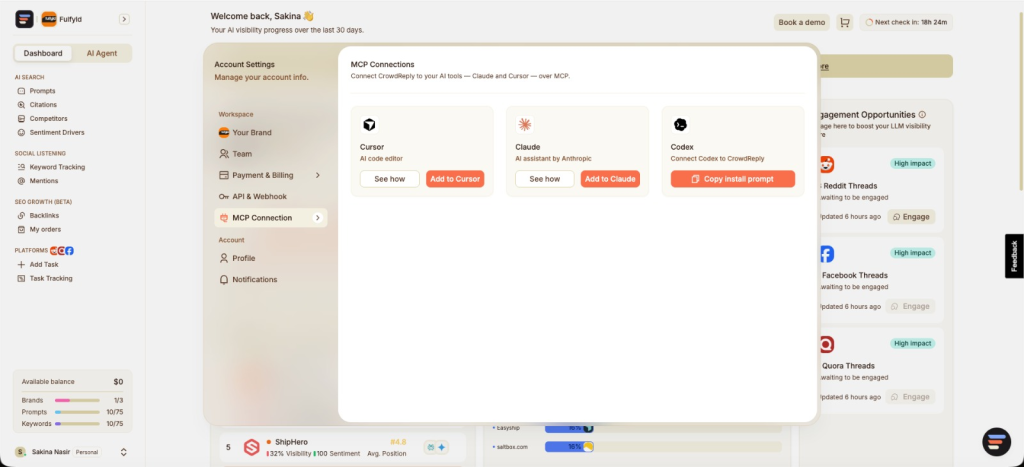
Open Account Settings → MCP Connection and connect Claude, Cursor, or Codex. Then just start asking.
Secure by design
- Two step confirmation on every change; you see the action and its cost before it runs.
- Your existing session, no API keys or extra credentials.
- Your permissions, respected, only the brands you own or were granted, and a full audit trail.
MCP vs. the dashboard
| Task | Dashboard | Over MCP |
|---|---|---|
| Check AI visibility | Open report, set filters | Ask one question |
| Compare citations & mentions | Export, compare manually | One conversation |
| Pause many prompts | Click each in batches | One instruction |
| Add keywords in bulk | Paste into the form | Paste into chat |
MCP doesn’t replace the dashboard, it’s a faster way into everything it already does.
From SEO to GEO: why AI visibility matters now
Search behaviour is shifting from a list of links to a single generated answer. More people now get what they need directly from ChatGPT, Google’s AI Overviews, Gemini, Perplexity, and Claude, without clicking through to a website at all. When the answer is written by an AI, the question that matters is no longer only “do I rank on page one?” but “does the AI mention and cite my brand?
Generative engine optimization (GEO), also called answer engine optimization (AEO), is the practice of earning that mention. It blends classic SEO signals (authority, clear content, structured data) with new ones: being quoted, cited, and recommended inside AI answers. Because those answers change constantly, GEO isn’t a one off project, it’s an ongoing loop of monitoring and response. That loop is exactly what CrowdReply’s MCP integration makes faster.
Frequently asked questions
What is the Model Context Protocol (MCP)?
An open standard from Anthropic (November 2024) that lets AI assistants securely connect to external tools and data the “USB-C for AI,” replacing custom per-tool integrations with one standard connection.
Which AI tools can I connect to CrowdReply?
Currently Claude, Cursor, and Codex, via the MCP Connection screen in Account Settings. Because MCP is an open standard, the list of compatible clients keeps growing.
Do I need an API key or coding skills?
No. It uses your existing CrowdReply login and you interact entirely in plain language — nothing to code, no keys to manage.
Is CrowdReply’s MCP integration secure?
Yes. It uses your existing session, respects your team roles and brand access, requires two-step confirmation for every change, never exposes other accounts, and logs every action.
Can I manage GEO and AI visibility from an AI chat?
Yes, check visibility, citations, competitors, and mentions, and act on them, all from a connected AI tool.
Does MCP replace the CrowdReply dashboard?
No. It augments the dashboard with a faster, conversational way to do the same work. The dashboard stays fully available.
Get started
Search is becoming a conversation, now managing your place in it can be one too. Connect CrowdReply to Claude, Cursor, or Codex and run your entire GEO account from a chat.
Connect your AI tools → · Find it under Account Settings → MCP Connection.